The Future of CRM: AI Agents, Autonomous Workflows & Revenue Teams

Your CRM used to be a place you put data in and hoped someone looked at it later. In 2026, that expectation is gone. The best CRMs now act on the data themselves to log calls, draft follow-ups, flag at-risk deals, and update records without a rep touching a keyboard.
This article breaks down what AI agents and autonomous workflows actually do inside a modern CRM, where the hype ends, and what an SMB should look for when the market is moving this fast.
What is an AI agent in a CRM?
Most CRM vendors have shipped some AI at this point. A summarizer here, a subject-line writer there. But the best AI CRMs go a step past that with AI agents. An AI agent can carry out a multi-step task on its own. Ask it to “follow up with everyone who went quiet after a demo last month,” and it can identify those contacts, draft a message tuned to each one’s last interaction, and queue them for your approval.
They are essentially autonomous workflows that operate with all the context in your CRM. HubSpot Breeze prospecting agent is one example, researching accounts and drafting first-touch outreach from CRM data.
You can imagine how that can be very powerful if implemented correctly.
The practical difference for a small team using an AI CRM vs a normal CRM is leverage. A three-person sales team can operate with the follow-up discipline of a much larger one, because the routine work happens whether or not anyone remembers to do it.
Discipline is not the same as tone, though, and agent-written follow-ups tend to reach every prospect with the same uniform rhythm and over-formal register. Before a queued draft goes out, plenty of teams pass it through an AI humanizer that restructures the sentences rather than swapping synonyms, so the message reads the way the rep actually writes.
What are autonomous workflows?
An autonomous workflow is a chain of actions the CRM completes end-to-end based on a trigger. A deal moves to “proposal sent,” so the system schedules the follow-up cadence, notifies the account owner, and updates the forecast.
Concrete examples that pay off fast in 2026:
- A new lead fills a form, the CRM enriches the contact, assigns an owner, and sends a personalized first email. A new lead fills a form, the CRM enriches the contact using data from lead intelligence tools for B2B teams, assigns an owner, and sends a personalized first email.
- A deal goes quiet, and the system drafts a check-in for you to send with one click.
- A call ends, and the AI writes the summary, updates the pipeline, and creates the follow-up task.
In the beginning, they don’t have to be completely autonomous. The sensible pattern in 2026 is “human in the loop for anything that touches a customer, autonomous for anything internal.” Let the CRM update records, route leads, and prep drafts on its own. Keep a quick approval step on outbound messages until you’ve watched it behave for a few weeks. Every credible platform now lets you set that boundary per workflow. Packaged workflows cover the common cases, but not every sales process is common. If your pipeline runs on custom pricing rules, territory splits, or a renewal cycle that looks like nobody else’s, the built-in triggers only take you part of the way. At that point you’re choosing between reshaping how your team sells to fit the platform and building the automation around the process you already have. Teams that take the second route often bring in AI software development services for CRM to build agents directly on top of Salesforce, HubSpot, or Dynamics. Those agents can log calls and emails to the right record, score leads against how your past deals actually converted, and flag opportunities that have stopped moving. It costs more and takes longer than switching on a feature, so it rarely makes sense for a three-person team. For a sales org with years of data and rules no packaged tool knows about, it can be the more practical option, as long as you keep the same approval step on anything that reaches a customer.
How does AI change the daily work of a revenue team?
Revenue teams benefit greatly from AI CRMs because AI is collapsing the wall between sales, marketing, and support. That shift is also changing how brands approach discovery, with generative engine optimization emerging alongside traditional SEO to improve visibility in AI-generated answers. GEO is becoming relevant across industries such as SaaS, finance, healthcare, and education, and a higher education GEO agency can apply those methods specifically to institutions competing for visibility among prospective students. When the CRM is the system acting on data, all three functions work off the same live picture of the customer.
For an SMB, that usually means people wearing multiple hats get their time back, and reps can spend the recovered hours on the conversations that actually close deals, which is the one thing AI still can’t do for you.
What should an SMB look for in an AI CRM?
A few things separate a CRM that’s genuinely ready for AI-driven work from one that just bolted a chatbot on top:
- Clean, connected data. AI is only as good as the records it acts on. A CRM that captures activity automatically keeps the underlying data trustworthy, which is what makes the agents useful instead of dangerous.
- Workflow automation you can actually configure. You want to set your own triggers and approval points without hiring a consultant to do it.
- Pricing that fits a small team. CRMs designed for SMBs offer the same enterprise-grade features but at a reasonable price.
- Fast setup. If it takes a quarter to onboard, the value arrives too late to matter.
Nutshell: AI CRM for SMBs
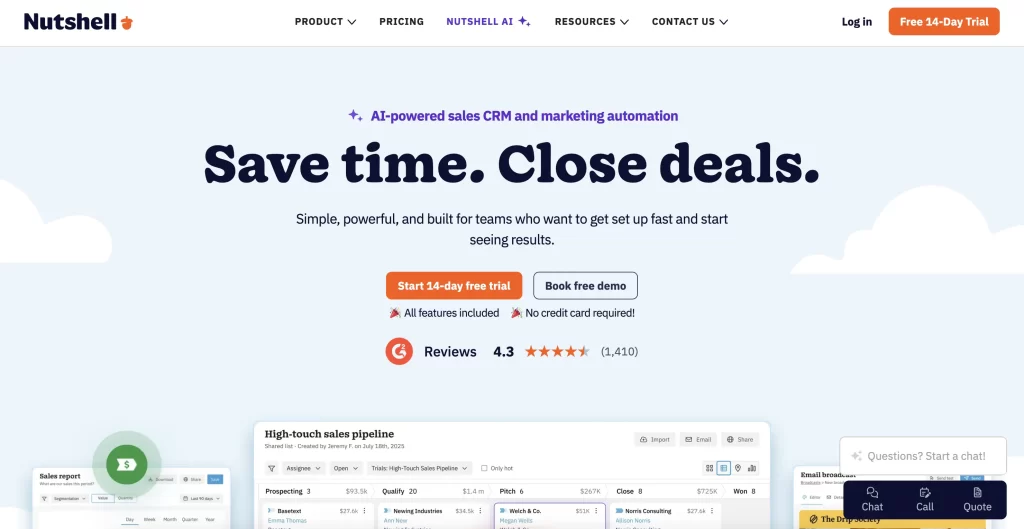
If you want the AI-era capabilities without the enterprise overhead, Nutshell is a strong fit for smaller teams. It pairs the automation and AI assistance you’d expect in 2026 with a setup that’s approachable for a business that doesn’t have a dedicated ops person, and pricing that stays reasonable as you grow.
And it’s now available on the NachoNacho marketplace with a 20% discount on all plans for two years. So the cost of getting your team onto a modern CRM drops meaningfully over the period where you’re actually proving out the value.
Learn more about this deal on NachoNacho >
Main Features of Nutshell
Beyond the core CRM features, Nutshell’s AI layer covers call transcription, lead enrichment, outreach writing, and reporting, letting sales teams spend less time on data entry and research and more time selling.
Nutshell’s AI agents handle:
- Call and meeting note-taking (Zoom, Teams, Google Meet, Kixie, Aircall, Dialpad, RingCentral, CallRail)
- Lead prospecting and enrichment (CompanyIQ, PeopleIQ, ProspectorIQ, VisitorIQ, Lead Researcher)
- Outreach writing (email sequences, reply suggestions, follow-up tasks)
- Daily/weekly summaries and lead recaps
- Sales coaching and pipeline strategy (Objection Coach, Pipeline Designer)
- Plain-English reporting (Smart Reports) and ChatGPT integration via MCP server
FAQ
Will an AI CRM replace my sales team?
No. It replaces the repetitive parts of their job, like data entry, note-taking, and routine follow-ups. Small teams use it to punch above their headcount and not to cut it.
Is an AI-powered CRM worth it for a small business?
Yes, if you pick one priced and built for your size. The value comes from time saved on admin, which matters more when everyone already wears several hats. Avoid enterprise platforms that need heavy setup.
How much does a good SMB CRM cost in 2026?
It varies by seats and features, but SMB-focused options are generally affordable per user. If you buy through the NachoNacho marketplace, offers like 20% cashback on Nutshell for two years lower the effective cost further.
Can I trust autonomous workflows to contact customers on their own?
Start with a human approval step on anything customer-facing, and let the CRM run internal tasks automatically. Once you’ve watched it perform, you can loosen the approvals where you’re comfortable.
What’s the difference between AI features and an AI agent?
AI features help with a single task, like drafting an email. An AI agent completes a multi-step job on its own, like identifying stalled deals, drafting tailored follow-ups, and queuing them for review.

Written by Andres Muñoz
If you would like to receive the latest deals added to NachoNacho, make sure you sign up for our newsletter below. We’re adding amazing software discounts you can’t miss!
Sign up for our newsletter