How to Choose the Right SaaS and AI Billing Plan for Your Business

A SaaS billing plan can fit your business perfectly on the day you subscribe and become expensive six months later.
Your team adds employees. A new client requires advanced reporting. An automation starts processing thousands of tasks instead of hundreds. An AI assistant that initially summarized a few documents becomes part of everyone’s daily workflow.
The software still works, but the assumptions behind the original purchase have changed.
AI adds another dimension to this decision. Alongside subscriptions and paid seats, businesses may need to budget for AI credits, token usage, and automated actions. Two teams with the same number of employees can generate very different bills depending on what they ask the software to do.
Choosing a plan therefore deserves the same attention as choosing the product. The package determines which capabilities your team can access, how spending grows, and how much freedom you have to adjust.
For business owners, founders, and operations teams, the goal is to connect pricing to actual work. This guide explains how to evaluate SaaS and AI billing plans, estimate their full cost, and choose a commitment that fits your business.
What Makes a SaaS or AI Billing Plan the Right Fit?
A useful plan supports your current operations and gives you a manageable path as requirements change. Evaluate that fit across functionality, access, and cost predictability.
Start With the Workflow and the Result You Need
Before comparing packages, identify the work the software needs to support.
For a sales team, that might involve capturing leads, assigning follow-ups, and reviewing pipeline performance. For an agency, it could mean managing projects, collecting feedback, and approving deliverables.
Apply the same discipline to AI features. “We need AI” is too broad to guide a purchase. “We need to summarize customer calls and create accurate follow-up tasks in our CRM” provides something concrete to evaluate.
Walk through the entire process. Identify the required integrations, permissions, reporting, and approval steps. For AI, also define what an acceptable result looks like and how much human review it should require.
A higher tier should solve a defined problem. Being able to name that problem makes the purchase easier to evaluate and the upgrade easier to justify.
Separate Software Access From AI Access
The number of employees in your business does not automatically equal the number of paid licenses you need.
Some people work in a tool throughout the day. Others occasionally review information. Clients and contractors may need access to one project.
AI requirements can differ within the same team. A researcher may use an AI assistant extensively, while another employee only needs access to finished reports.
Check whether the vendor allows those needs to be reflected in the purchase. Can AI access be assigned to selected employees? Is an upgrade required across the workspace? Are usage allowances individual or shared?
A plan is easier to manage when you understand both who needs access and who will generate additional consumption.
Decide How Much Spending Variability You Can Accept
A fixed subscription can make budgeting easier. Usage-based pricing can accommodate changing demand, provided you can measure and control consumption.
Consider what happens during a busy month. A seasonal increase in customer inquiries may justify higher AI support costs. Unexpected background activity from an automation is a different situation.
Establish an acceptable spending range and identify who can authorize increases. This gives you a practical basis for comparing plans with different combinations of fixed charges and variable usage.
Match Your SaaS and AI Plan to Your Business Stage
Business stage provides useful context, but the role of the software matters just as much. An early-stage company may have dependable accounting requirements while still experimenting with AI research tools.
Early-Stage Businesses: Validate Adoption Before Expanding the Commitment
Small teams often purchase software while their processes are still taking shape. Responsibilities change, tools are tested, and workflows evolve.
A useful starting plan lets the team complete real work while keeping the commitment manageable.
For AI tools, test several representative tasks before purchasing a large allowance. Find out whether employees use the output, how much editing it needs, and how quickly the included capacity disappears.
A free or entry-level plan still needs to meet essential requirements. Missing integrations or restrictive limits can create manual work that outweighs the savings.
Define what would justify an upgrade, such as sustained usage, a required approval workflow, or a measurable reduction in time spent on a recurring task.
Growing Teams: Model the Next Increase in Demand
For a growing business, the important question is how the plan behaves as more people and processes depend on it.
Growth may mean additional seats, more customer contacts, or greater automation volume. With AI, consumption can also increase while headcount stays unchanged.
A team that moves from occasional document summaries to daily analysis of every customer conversation has changed its workload substantially.
Ask the vendor to explain the cost at your next realistic milestone. Determine whether growth produces an incremental charge, requires additional credits, or triggers an upgrade for the entire account.
Established Businesses: Evaluate Control and Reliability
Once software supports a critical process, subscription price becomes one part of a broader decision.
The business may need centralized access management, dependable support, usage reporting, and integrations with existing systems. AI features may also need controls over which information employees can access and which actions require approval.
Involve the people who use, administer, and pay for the software. Department owners can define quality requirements, IT can assess implementation, and finance can evaluate the commitment.
Choose a package whose operational benefits are clear and whose consumption can be traced to the teams and workflows generating it.
Understand What Your SaaS and AI Plan Actually Charges For
A single product can combine several pricing structures. A subscription might include paid seats, feature limits, a shared AI allowance, and additional charges when that allowance runs out.
Identify each component before comparing the total.
Per-User Pricing and Workspace Requirements
Per-user pricing is straightforward when everyone needs similar access. It becomes more complicated when the workspace includes administrators, occasional contributors, and external partners.
Check which roles are billable and whether different users can have different packages.
ClickUp, for example, states that upgrading a workspace requires upgrading all its members. A feature requested by one department can therefore affect the cost across the workspace. See ClickUp’s pricing FAQ.
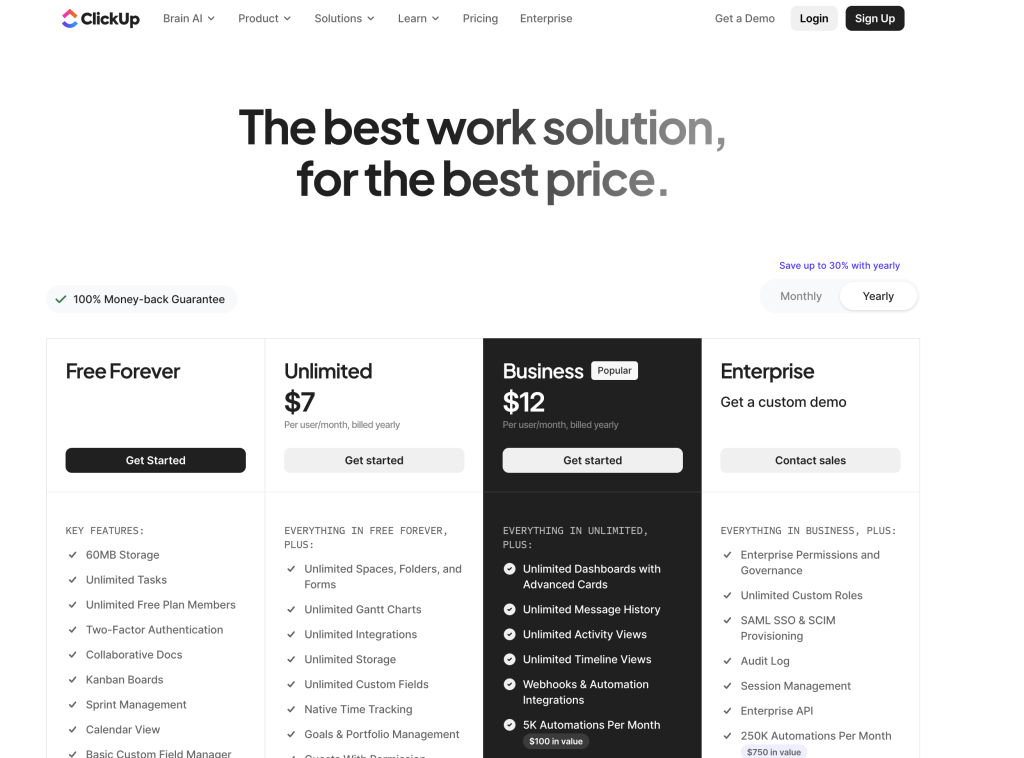
In a hypothetical 30-person workspace, a $5 increase per user adds $150 per month, or $1,800 per year.
Evaluate the benefit against that total. An upgrade that removes a recurring bottleneck across the company has a different value from a feature used occasionally by one person.
AI Credits and Included Allowances
AI credits are units defined by the vendor. Their meaning depends on the product and the activity being performed.
A credit allowance cannot tell you how much useful work you can complete until you know what each task consumes. Avoid assuming that one credit equals one prompt, one token, or one completed task.
ClickUp’s documentation, for example, explains that credit consumption varies with the complexity and number of actions involved. Its AI credits renew monthly and do not roll over. See how ClickUp AI credits are consumed.
Before buying a credit package, establish:
- Which features consume credits.
- Whether the allowance is shared or assigned to individual users.
- Whether unused credits expire or roll over.
- What happens when the balance reaches zero.
- Whether additional purchases happen automatically.
Compare the allowance against a tested workflow. The same advertised credit quantity can represent very different capacity across products.
Subscription Access and API Usage
Using AI inside a software application and connecting an AI model to your own automation are different purchasing arrangements.
A hosted product may bundle AI access into its subscription or credit system. An API integration connects software directly to a model provider and may generate a separate usage bill.
Confirm where the charges will appear. If an automation requires your own provider account or API key, ask whether the software subscription covers any model usage.
Also check what happens when an included AI allowance is exhausted. The product might pause a feature, require a top-up, apply an additional charge, or offer a different level of access. That behavior affects both your budget and your operations.
How AI Token Pricing Works
Token pricing matters when your business pays directly for AI model usage or purchases a product that passes those charges through.
You do not need to become an AI engineer to evaluate it. You need to understand what is measured, which rates apply, and how much activity your workflow generates.
Input Tokens and Output Tokens
For text-based AI, tokens are the pieces of text a model processes. They can represent words, parts of words, or other character sequences. OpenAI’s token overview explains how text is divided into these units.
Input tokens represent information sent to the model, such as instructions, source documents, and conversation content. Output tokens represent generated content.
Providers can charge different rates for input and output. OpenAI’s API pricing, for example, lists separate rates per million tokens.
This means request count alone is insufficient for estimating cost. Summarizing a short email and analyzing a large collection of documents can require very different amounts of processing, even if each begins with one user request.
Ask for usage estimates based on your actual materials and expected results.
A Practical Token Cost Example
Consider a fictional AI workflow that summarizes customer conversations.
Assume the following rates and usage:
- Input: $2 per million tokens.
- Output: $8 per million tokens.
- Average billed input per summary: 2,000 tokens.
- Average billed output per summary: 500 tokens.
- Monthly volume: 10,000 summaries.
These are illustrative figures, not a quote from a specific provider.
The monthly input volume is 20 million tokens, costing $40. The output volume is 5 million tokens, also costing $40.
Estimated monthly model cost: $80.
The calculation is:
Input cost + output cost = total token cost
Now consider changes in both volume and task size:
| Monthly summaries | Average input tokens per summary | Average output tokens per summary | Estimated monthly token cost |
|---|---|---|---|
| 10,000 | 2,000 | 500 | $80 |
| 20,000 | 2,000 | 500 | $160 |
| 20,000 | 6,000 | 1,000 | $400 |
All token volumes represent billed usage. These examples exclude caching, software subscriptions, tool fees, taxes, and other charges.
The final scenario costs more because the business processes more conversations and asks the AI to handle more material for each one. Forecast both factors when estimating demand.
Cached Input and Additional Processing Costs
Some providers offer different pricing when previously processed input can be reused through caching. The applicable rules matter: OpenAI documents model-specific cached-input and cache-write pricing in its prompt caching guide.
For a buyer, the practical question is whether projected savings appear in actual usage. Request an estimate based on observed caching rather than assuming every repeated document qualifies for the lowest rate.
Check additional services as well. OpenAI’s pricing documentation lists separate charges for certain tools and storage alongside model usage.
Ask for the full workflow cost. A low token rate does not describe every expense involved in searching information, processing files, and delivering a completed result.
Compare AI Plans by the Cost of Useful Work
A pricing page describes what you purchase. A trial shows how effectively that purchase supports your business.
Measure the Cost per Accepted Result
Track how many outputs meet your requirements and how much human effort is needed to finish them.
For example, imagine two fictional tools used to prepare customer reports:
| Measure | Tool A | Tool B |
|---|---|---|
| Monthly software and AI cost | $100 | $180 |
| Reports meeting the same acceptance criteria | 100 | 300 |
| Software and AI cost per accepted report | $1.00 | $0.60 |
Tool B has a higher monthly bill but a lower cost per accepted report in this example.
That comparison is useful only if the business needs the additional reports and the quality standard is consistent. A team needing 80 reports per month may have little reason to pay for the larger package.
Record human review time separately. A tool that requires extensive corrections can consume the time it was purchased to save.
Test Normal, Busy, and More Complex Workloads
Build three scenarios from your expected use: a typical month, a busy month, and a month with more demanding tasks.
For AI software, higher demand may involve longer documents, additional research steps, or more revisions. For conventional SaaS, it may involve extra users, contacts, storage, or automation runs.
Test each scenario against the plan’s limits. Identify the point at which another package becomes more economical.
Also inspect spending controls. An alert tells someone that usage is rising; a hard limit stops further consumption. Confirm which controls the product provides and what happens to essential work when a limit is reached.
Choose the Right Billing Commitment
Once you understand the package and its consumption model, decide how long you are comfortable committing.
When Monthly Billing Makes Sense
Monthly billing can suit temporary projects, uncertain demand, and tools that are still being evaluated.
An agency buying software for a three-month engagement has a different time horizon from a company adopting a core accounting system. A higher monthly rate can cost less overall if the subscription can end when the project finishes.
For AI tools, a shorter commitment also gives you time to establish a reliable usage baseline. Observe how consumption changes after the initial experimentation period and whether the team continues using the product.
Confirm that monthly payment actually allows the commitment to end each month.
When Annual Billing Delivers Value
Annual billing is easier to justify when a tool already supports an established workflow and its requirements are understood.
Calculate when the discount becomes worthwhile. Suppose a fictional subscription costs $300 per month or $3,000 for a year.
Break-even point: $3,000 ÷ $300 = 10 months.
At ten monthly payments, the costs are equal. Beyond ten months, the annual option is cheaper, assuming monthly cancellation is permitted and the annual payment is non-refundable.
For AI products, check what the annual discount covers. A reduction in the base subscription does not necessarily reduce variable usage charges. Also confirm whether an annual purchase provides monthly allowances or a pool available throughout the year.
Distinguish Payment Frequency From Contract Length
A monthly invoice can still be part of an annual agreement.
HubSpot’s Marketing Hub Professional pricing, for example, offers monthly payments with an annual commitment. See HubSpot’s Marketing Hub pricing.
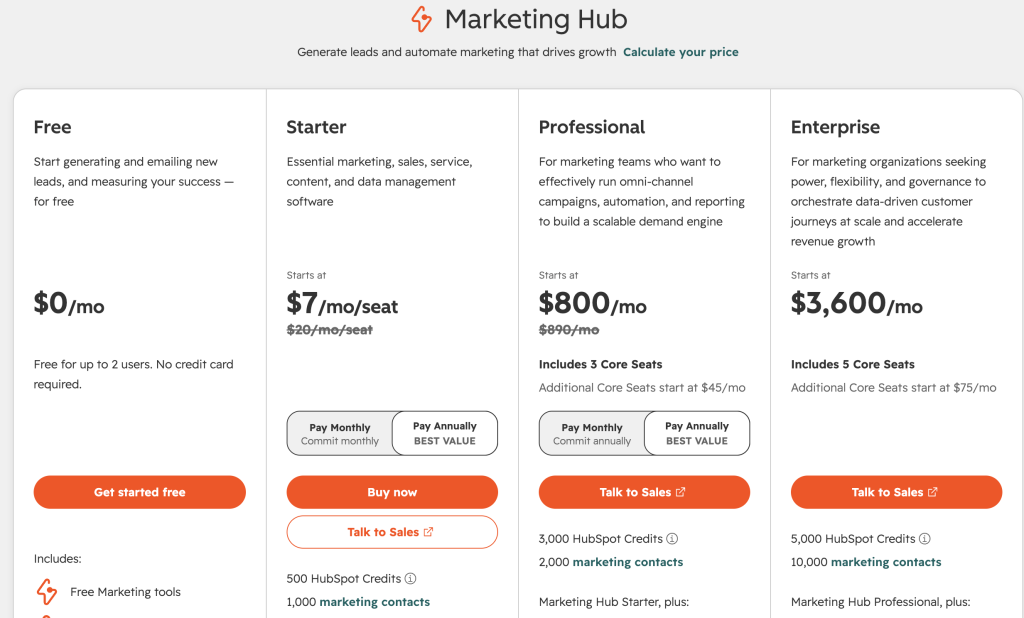
Record the payment schedule, commitment end date, and conditions for reducing the subscription. Include any separate commitments for AI add-ons or prepaid usage.
The comparison should make clear how much money is due, when it is due, and how long the business remains committed.
Compare the Full Cost Before You Commit
At this stage, compare your shortlisted packages using the same assumptions about users, workload, quality, and purchase period.
Include Implementation and Renewal Costs
The first year can include onboarding, migration, training, required add-ons, and a period when old and new products operate together.
Some costs are mandatory. HubSpot lists required onboarding separately for Marketing Hub Professional and Enterprise on its pricing page.
For AI workflows, include the effort needed to prepare source information, configure integrations, evaluate outputs, and maintain the process.
Keep cash expenses and internal time estimates separate. Both matter, but they affect the budget differently.
Then calculate the renewal year. Remove one-time setup costs, account for expiring promotions, and adjust for expected growth.
A fictional $100 monthly subscription offering 50% off for the first three months costs $1,050 in year one and $1,200 in year two at the unchanged standard rate. The first-year saving is 12.5%, even though the promotion advertises 50% off.
A Worked Example: Comparing SaaS Plans With AI Usage
Imagine a 12-person business evaluating two fictional plans for the same product.
Both support the required workflows and deliver equivalent AI functionality. Plan A has a lower seat price but charges separately for automation and AI usage. Plan B includes automation and a monthly AI allowance.
All figures below are hypothetical, use monthly billing, and exclude taxes and setup costs. Credits have the same meaning in both plans.
| Cost component | Plan A | Plan B |
|---|---|---|
| Price per user per month | $12 | $18 |
| Required automation | $90 per workspace per month | Included |
| Included monthly AI credits per workspace | None | 10,000 |
| Price per additional AI credit | $0.01 | $0.03 above the allowance |
At 12 users and 6,000 AI credits per month:
- Plan A: $144 for seats + $90 for automation + $60 for AI = $294.
- Plan B: $216 for seats, with automation and sufficient AI capacity included = $216.
Plan B saves $78 per month, or $936 over a year if usage remains unchanged.
Now assume the team grows to 20 users and consumes 20,000 credits monthly. The workspace allowance remains fixed.
- Plan A: $240 + $90 + $200 = $530.
- Plan B: $360 + $300 for 10,000 excess credits = $660.
The better-value option changes because the plans combine seat prices, included capacity, and additional usage rates differently.
Compare the complete configuration at your current workload and your next realistic stage of growth. An attractive starting package can become expensive once a different part of its pricing takes effect.
What to Validate During a Trial or Demo
A pricing comparison remains an estimate until you test the workflow and confirm the agreement.
Test the Package You Intend to Purchase
Run representative work from beginning to end with the employees who will use the system.
Check which tier the trial activates. Premium features or generous temporary AI allowances can create an inaccurate impression of the package you intend to buy.
For AI workflows, record usage, output quality, completion time, and human review effort. Include difficult examples alongside straightforward tasks.
Compare the results against your existing process. That evidence will tell you whether the software improves the work enough to justify its full cost.
Confirm Limits and Billing Controls
Ask questions tied to your expected use:
- What happens when our included AI or automation allowance runs out?
- Which actions, retries, or unsuccessful runs are billable?
- Can we buy capacity without upgrading the entire workspace?
- Can administrators restrict top-ups or usage by team?
- Does the spending control stop activity or only send an alert?
- Which capabilities change if we downgrade?
Request a demonstration of the relevant settings and a quote reflecting the configuration you tested.
Review Downgrades, Cancellation, and Data Access
Find out when seat reductions and downgrades affect billing.
Notion, for example, prorates charges for members added during a billing interval, while reductions take effect at the next billing cycle. See Notion’s billing guide.
Also distinguish refunds from account credits. Slack’s fair billing policy provides non-refundable credits for qualifying inactive members on eligible subscriptions. See Slack’s fair billing policy.
For AI products, confirm what happens to unused purchased credits and whether removing an add-on changes access to saved work.
Check what you can export, estimate the effort required to move, and assign a subscription owner. Schedule a review early enough to act before the renewal or cancellation deadline.
Conclusion
Choosing the right SaaS and AI billing plan requires a clear understanding of how your business will use the software and how that activity becomes a charge.
Start with the workflow, essential features, and people who need access. Identify every billing component, including subscriptions, paid seats, AI credits, token usage, and required add-ons.
Then test the economics. Measure a representative workload, compare normal and busy periods, and evaluate the cost of results your team can actually use. Choose a commitment that reflects your confidence in continued adoption and your ability to predict demand.
Different tools within the same business can reasonably follow different approaches. An established system may justify annual billing, while an experimental AI workflow may benefit from a shorter commitment and closer usage monitoring.
Keep a record of the assumptions behind the purchase. At renewal, compare them with actual adoption, consumption, and results.
A well-chosen plan supports today’s work, makes tomorrow’s costs understandable, and gives the business a practical way to adjust as its needs change.