Slack Pricing Explained Simply (2026)

If you’ve ever stared at Slack’s pricing page and done some quick mental math that ended in a number large enough to make a CFO faint, you’re not alone. This happens way too often. And usually, it isn’t calculated properly. The sticker price and the real bill are two very different things.
Here’s how Slack pricing actually works, what the per-user number really means, and the one scenario where the pricing genuinely does spiral out of control.
The 4 Slack Pricing Tiers
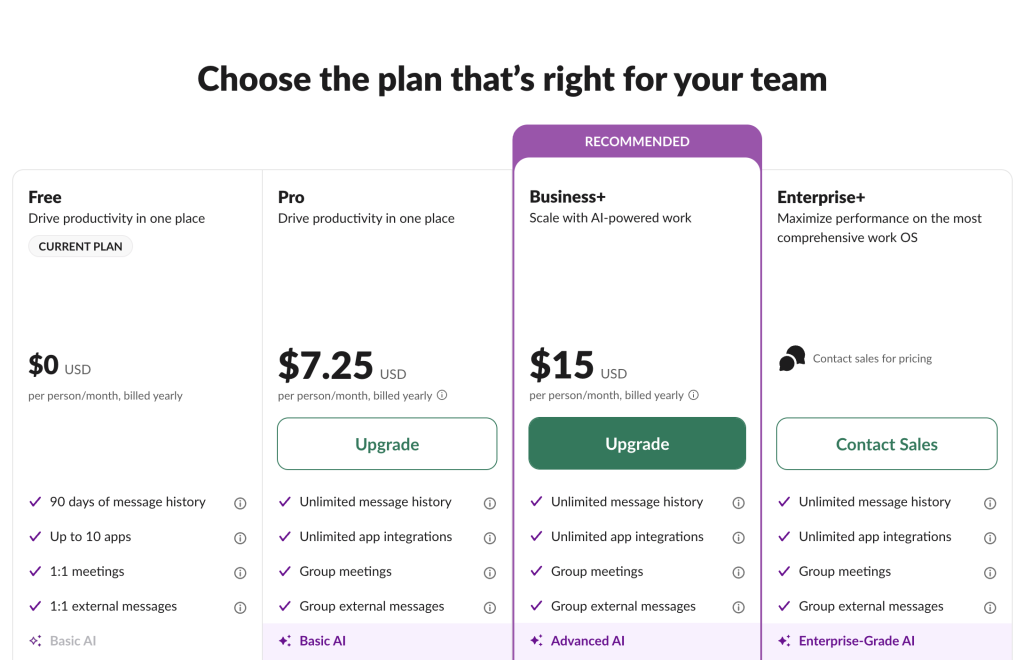
Slack sells four plans. Prices below are US list prices for annual billing (pay upfront once a year). Monthly billing runs roughly 20% higher.
| Plan | Annual price (per user/month) | Monthly price | Best for |
|---|---|---|---|
| Free | $0 | $0 | Small teams testing the waters |
| Pro | $7.25 | $8.75 | Most teams that use Slack for real work |
| Business+ | $15 | $18 | Bigger orgs needing SSO, compliance, admin control |
| Enterprise+ | Custom (contact sales) | — | Large enterprises, regulated industries |
The jumps between tiers are mostly about three things:
- How long your message history sticks around
- How much admin and security control you get
- How powerful the built-in AI is
Free keeps only 90 days of message history and caps you at 10 app integrations. It’s genuinely usable for a small side project, but the 90-day limit is the wall most growing teams hit. After three months, older decisions, links, and files drop out of search. They’re not deleted, just hidden until you upgrade.
Pro unlocks unlimited message history, unlimited app integrations, group huddles and calls, and the ability to collaborate with outside organizations. For any team that relies on search to find what was decided last quarter, Pro usually pays for itself.
Business+ roughly doubles the price and shifts the focus from productivity to governance: SAML single sign-on, SCIM user provisioning, compliance data exports, advanced Slack AI, a 99.99% uptime guarantee, and faster priority support. Most teams under 50 people without specific compliance needs won’t need it.
Enterprise+ is the only tier with no public price. It adds the usual heavy-duty controls that enterprises need, like enterprise key management, data loss prevention, HIPAA support, and unlimited connected workspaces.
How Slack Pricing Works (Billing Per Active User)
This is the single biggest source of confusion.
Slack does not charge you for every person who has an account in your workspace. Under what Slack calls its Fair Billing Policy, you’re only billed for members who actually do something: send a message, react, or open a file within a rolling 28-day window. People who don’t log in during that period don’t show up on your bill, and if someone goes quiet mid-cycle, Slack credits you back the prorated difference.
So thinking “we have 500 accounts × $7.25 = our bill” is almost always wrong. Your real bill tracks the people who are actively showing up each month.
There’s a flip side, though: your bill can surge when activity surges. If you run a big event, onboard a wave of new people, or have a quiet workspace suddenly light up, and your active-member count climbs with it.
Other Considerations
A handful of details trip people up after they’ve signed up:
- Everyone’s on the same plan. You can’t upgrade just yourself or just the five people who need advanced features. A workspace is one plan, top to bottom. (This is a long-standing frustration for teams who only need premium features for a subset of people.)
- There’s a 3-seat minimum on paid plans. A two-person startup on Pro still pays for three seats, about $21.75/month, so you’re effectively covering one ghost employee.
- Annual billing is meaningfully cheaper. Paying monthly costs roughly 20% more per seat. If you’re confident you’ll use Slack for a year, annual is close to a no-brainer.
- Apps can cost extra. Many popular integrations (Zoom, Salesforce, and others) charge their own subscription on top of Slack.
- Renewals can creep up. Since the Salesforce acquisition, some buyers report price increases at renewal unless they commit to longer terms or larger volumes, so it’s worth reviewing your contract before it auto-renews, and negotiating if you’re at any meaningful scale.
Slack Pricing for Communities
You can build a community on Slack for free. A Free workspace lets unlimited people join channels and talk to each other at no cost. The only problem is the 90-day message history limit. Conversations older than three months drop out of view (they’re hidden, not deleted), so your community’s knowledge base effectively resets every quarter. For a casual, in-the-moment group that might be fine; for a community where people search past discussions to learn, it’s a real limitation.
The trouble starts when you try to fix that limit by upgrading. If you want to build a community on Slack through a paid plan, pricing can get very expensive, very fast. For example, 10,000 members × $7.25 ≈ $72,500 per month. (At the monthly rate, it’s closer to $87,500.)
This is where Slack’s model genuinely works against you, and it’s worth understanding exactly why before you commit.
Can’t they just join as free guests?
Partly.
Slack gives you five free single-channel guests for every paid active member. So to host 10,000 free guests, you’d need 2,000 paid seats underneath them, which is roughly $14,500/month just for the hosts. And single-channel guests live up to their name: each one can see exactly one channel.
What about multi-channel guests?
Those can roam across channels, but Slack bills them as full paid members. So that’s not a discount.
Slack is priced for organizations, not open communities. Its per-active-user model is wonderful when “users” means employees and contractors who all need to be in the room together. It becomes punishing when you build a community. The platform wasn’t built to be a 10,000-person public forum, and the pricing reflects that.
Discord (which now supports threaded conversations and dedicated forum channels) is a common alternative because it allows you to scale large communities without per-head billing.
How to Save on Slack 25%
Through the SaaS marketplace NachoNacho, eligible companies can get 25% off the first 12 months of an upgrade to Slack Pro or Business+, on either monthly or annual billing.
This is an exclusive promotion only available through NachoNacho, the largest software discount marketplace, trusted by thousands of businesses saving millions.
Redeeming a deal on NachoNacho takes only a few minutes, and after that you can enjoy a 25% discount on your subscription. Click below to learn more or redeem.
So, how much will Slack cost you?
Strip away the confusion and it comes down to a few questions:
- How many people will be genuinely active each month? Not how many accounts exist, but how many show up.
- Do you need compliance, SSO, and admin control? If not, Pro almost always covers it. If yes, budget for Business+ or Enterprise+.
- Are these your people, or a community? Internal teams: Slack’s pricing is reasonable and the fair-billing model is in your favor. Large external community: unless you’re using a free plan, it will get very expensive.

Written by Andres Muñoz
If you would like to receive the latest deals added to NachoNacho, make sure you sign up for our newsletter below. We’re adding amazing software discounts you can’t miss!
Sign up for our newsletter